Architecture of OnOrbitROS
OnOrbitROS serves as a foundational platform for the study and development of on-orbit applications, leveraging the powerful combination of ROS and Gazebo for hyper-realistic simulations.
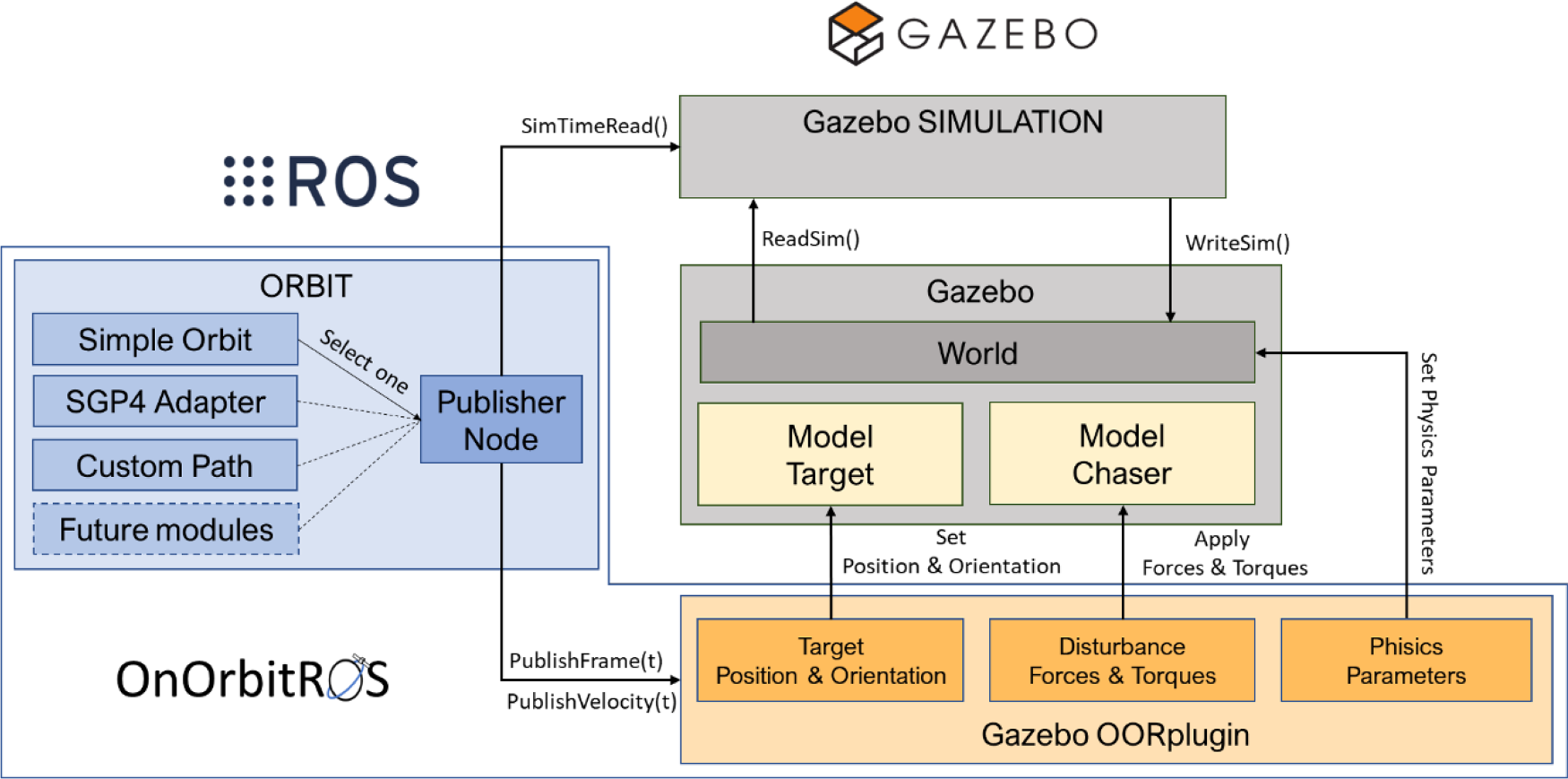
Here you can find the architecture of the framework. In the OnOrbitROS workspace installed (see Installation Guide for more info on how to install it) you will find many pacakges, and the main structure is shown in the follwowing image.
Note
For extended information about this framework, its architecture, packages and controllers, and some applications go to doi.
Ramón, J. L., Pomares, J., & Felicetti, L. (2023).
Task space control for on-orbit space robotics using a new ROS-based framework.
Simulation Modelling Practice and Theory, 127(102790), 102790.
https://doi.org/10.1016/j.simpat.2023.102790
There are two main packages:
- ORBIT: generates spacecraft trajectories.
- Gazebo OORplugin: extends and modifies the physics engine to align with the conditions of an On Orbit Servicing (OOS) application.
This image also shows the two main elements of an OOS application: the target spacecraft (target) and the servicing spacecraft (chaser), which hosts the robot or serves as the robot itself. All models are defined using Simulation Description Format (SDF) definitions. From this structure, complex OOS systems can be simulated with elements such as force sensors, cameras, laser sensors, etc, as well as complex robots as humanoids.
Reference Frames
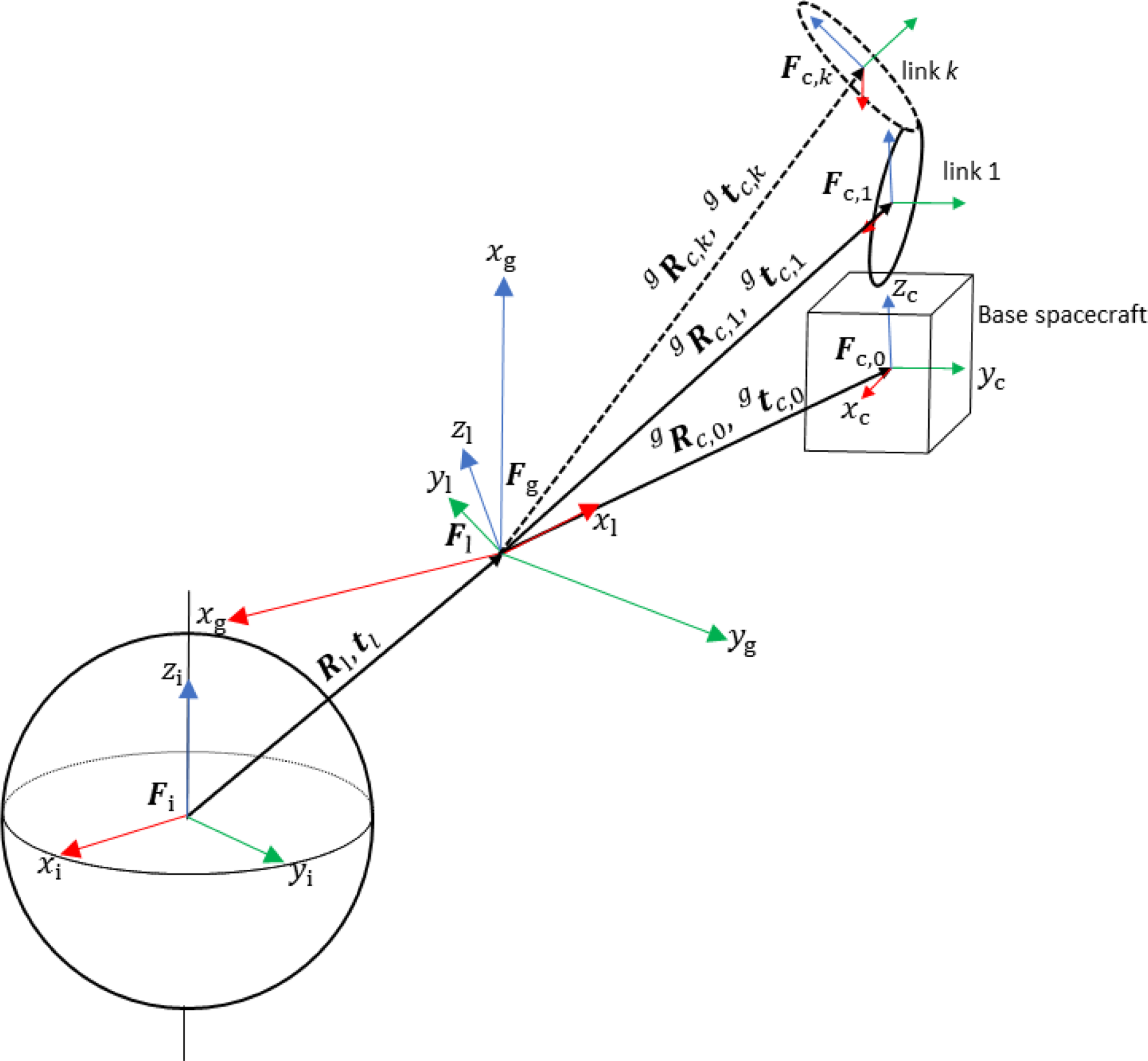
The following image represent the different elements found in OOS and their reference frames:
- Ft: Located at the center of mass of the target spacecraft.
- Fc: Located at the center of mass of the chaser.
- Fi: Earth-Centered Inertial frame (ECI), located at the center of Earth with its x axis going from the center of Earth passing along the vernal equinox, the z axis coincident with the axis of rotation of the Earth and pointing to the north pole, and the y axis completing the orthogonal triad.
- Fl: Local Vertical Local Horizontal (LVLH) to define the position of any object with respect to a specific orbital position with the x axis coincident with the direction of the radial vector that goes from the center of Earth to the spacecraft, the y axis that with the x axis form the orbital plane and describes the direction of the spacecraft's movement, and the z axis completing the triad being normal to the orbital plane.
- Rl and tl: represent the rotation and translation of the LVLH frame with respect to the ECI.
- Fg: the Gazebo own reference frame, assumed to have the same orientation as Fi (ECI) but centered as Fl (LVLH). That way we can simulate the proximity dynamics of the chaser around the target, assuming that the latter is moving along its orbit and the relative orientation between Fl and Fg is given by Rl , calculated by the Orbit module.
- gRc and gtc: represent the rotation and translation matrices to describe the relative attitude and position of the chaser frame with respect to the Gazebo frame.

ORBIT
The main function of this module, implemented as a ROS publisher node, is to generate the orbital trajectories of the bodies that compose the simulation. It has this submodules:
- Simple Orbit: This module can be used for the generation of trajectories that describe Keplerian orbits. This module is described in greater detail in Appendix A of the above mentioned paper in the Note. It is the default option for OnOrbitROS and it does not require any external library.
- Custom Path: This module can be used to model user-defined trajectories that do not fall in the previous case. It uses the external library Kinematics and Dynamics Library (KDL) to generate trajectories based on a series of points by interpolating them by splines. In this case, a series of points are introduced by the user in the ROS parameter server (a data structure composed of a set of positions, velocities and accelerations, and the time instant in seconds to achieve each pose), and the Custom Path module generates the interpolated trajectory.
The user defines the orbit or trajectory that best fits the trajectory to be modelled in the launch file, and the Publisher Node instantiates the corresponding object. The Publisher Node provides the timing to the corresponding object, and the object generates the values Rl , tl and νl of the generated orbit or trajectory. Different parameters are required depending on the orbit or trajectory to be generated. For example, for the Simple Orbit module, parameters such as the semi-major axis, a, eccentricity, e, argument of periapsis, w, right ascension of ascending node, Ω, inclination, i, and instant of time of perigee passage, tp should be defined. Finally, for defining a custom trajectory, initial, final, and intermediate positions, velocities, accelerations and times should be provided. This information is indicated by the user in the YAML configuration file and stored in the ROS Parameter Server. The ROS Parameter server is common to all nodes and allows sharing of parameters between different nodes.

Define an Orbit
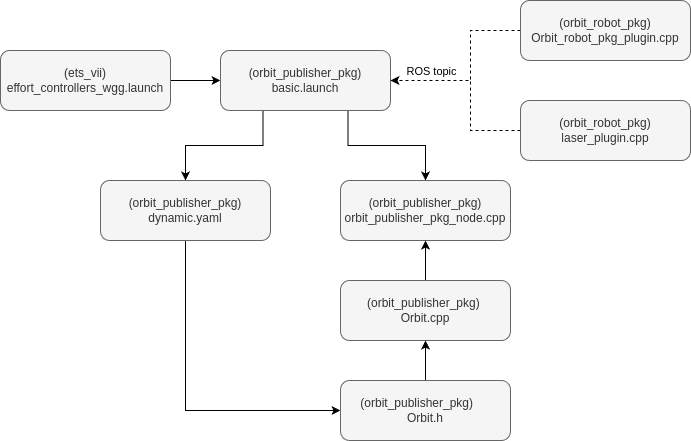
The orbit is declared in a .yaml file located in orbit_ws > orbit_publisher_pkg > config (by default the file is dynamic_orbit.yaml), and defines the LVLH information in reference to the ECI. Then that file has to be loaded from the application's launch file, for example orbit_ws > ets_vii > launch > effort_controllers_wgg.launch for the ETS VII application, that calls another specific launch which by default is basic.launch or fix_basic.launch for fixed orbits, and located under orbit_ws > orbit_publisher_pkg > launch.
In the declaration from the launch of the project you can define the .yaml to be used and whether it is called through a dynamic (upper example) or a fixed (lower example) launch. In case the orbit is not fixed, you can also specify whether the orbital parameters calculated from the State Vector are published during the simulation or not in the argument publish_orbit_parameters (values such as Inclination, Eccentricity, RAAN, etc).
<!-- Launch orbit and orbit plublisher package -->
<arg name="publish" default="true" />           <!-- custom -->
<include file="$(find orbit_publisher_pkg)/launch/basic.launch">        <!-- custom -->
    <arg name="orbit_file_name" value="dynamic_orbit.yaml" />     <!-- custom -->
    <arg name="publish_orbit_parameters" value="$(arg publish)" />
</include>

OR

<include file="$(find orbit_publisher_pkg)/launch/basic_fix.launch">     <!-- custom -->
  <arg name="orbit_file_name" value="fixed_orbit.yaml" />     <!-- custom -->
</include>
The information from the orbit .yaml file is read by orbit_ws > orbit_publisher_pkg > src > Orbit.cpp (that uses Orbit.h header that has all the variables and methods defined). The relevant orbit information is then published in their corresponding topics from the file orbit_ws > orbit_publisher_pkg > src > orbit_publisher_pkg_node.cpp (for fixed orbits the information is published from fix_orbit_publisher_pkg_node.cpp). In case more orbital information wants to be shared with the plugin it will be published from this script.
Default Orbit Information
Orbit information declared in the
.yamlfile in the Simple Orbit default module. The value's units are km and º accordingly as presented in Two-Line Element (TLE) set.
            publish rate
            eccentricity
            semi major axis
            inclination
            rate of right ascension
            initial right ascension
            rate of argument of perigee
            initial argument of perigee
            initial mean anomaly
            time pass perigee
            time start
            angular velocity
            atmosphere angular velocity
            drag coefficient
Published Orbit Information
Information being published in the following topics. By default, the air density is calculated following the US Standard Atmosphere 1976 (USSA76) standard on each iteration from the altitude value (also calculated on each iteration from the other orbital parameters).
            /OrbitPosition
            /OrbitVelocity
            /AtmosphereAngularVelocity
            /OrbitAirDensity
            /OrbitDragCoeffient
            /OrbitAltitude
Note
The air density is calculated automatically with the USSA76 density profile from sea level to an altitude of 1000km. For orbits above that a different method should be taken into account, although atmospheric drag at that altitude could be disregarded.
Other information regarding the orbital parameters is calculated during the simulation from the State Vector (position and velocity). This data can be published or not by specifying it when calling the launch file, under publish_orbit_parameters.
            /OrbitArgumentOfPerigee
            /OrbitEccentricity
            /OrbitInclination
            /OrbitPeriod
            /OrbitRAAN
            /OrbitSemiMajorAxis
            /OrbitTrueAnomaly
Hierarchy
Hierarchy of the files involved in the declaration and use of the orbit for the ETS VII example:
Gazebo OORplugin
This module in OnOrbitROS is responsible for modifying the parameters of the physics engines used by Gazebo to create a realistic simulation environment for OOS applications. It eliminates effects like gravity, wind, and magnetism, typically applied in simulations assuming they occur on the Earth’s surface. Instead, this module applies the relevant torques and forces specific to OOS scenarios.
A plugin has been developed to consider the following perturbations that are present in orbital applications:
- Gravity gradient.
- Forces generated by the relative motion to an elliptical orbital.
- Atmospheric drag.
Applied perturbations
As the orbit is defined in the package orbit_robot_publisher, the OORplugin is mainly found under orbit_robot_pkg.
Load and use the plugin
The defined spacecraft, located under the project's package urdf folder, must include the following plugins, one for the control and the other lo load the Gazebo OORplugin. The page Add a spacecraft of this documentation has a guide on how to define this URDF.
<gazebo>
    <plugin name="gazebo_ros_control" filename="libgazebo_ros_control.so">
        <robotNamespace>/</robotNamespace>
    </plugin>

   <plugin name="Orbit_robot_pkg_plugin" filename="libOrbit_robot_pkg_plugin.so"/>
</gazebo>
That plugin is defined under > orbit_ws > src > orbit_robot_pkg > src > Orbit_robot_pkg_plugin.cpp, and uses the header OrbitLink.h from OrbitLink.cpp. These two latter files are used to define the properties of each link of the spacecraft, both cinematically and dynamically (such as positions, torques, velocities, etc), and to apply the gravity gradient and forces generated by the relative motion to an elliptical . Then, those methods are used by the principal file, Orbit_robot_pkg_plugin.cpp, that manages the subscription to the orbital topics explained above and manages the application of those perturbations and the atmospheric drag. The script includes comments that can be checked to better understand the implementation.
Perturbation from Gravity Gradient
Calculates the main perturbing torques caused by the gravity gradient and simulates them with OnOrbitROS. These torques vary in the different parts of each rigid body that form the chaser spacecraft (each link of the model), and once they are calculated, they are applied in each iteration of the simulation by this module.
In the next image you can see the main transformations to compute the perturbing torques for the ETS VII example, and more information about the equations behind the calculus can be found in the paper on the Note.
Relative motion with respect to an elliptical orbit
Computes the apparent forces due to the relative motion with respect to the reference frame describing the orbit. These forces are of great importance in operations where a chaser satellite flies in proximity of a target. Such forces are calculated and applied to each body of the OOS scenario, alongside the gravity gradient forces, by the module Gazebo OORplugin at each iteration of the simulation.
Atmospheric drag
In relation to the atmospheric drag, it affects the surfaces going in the opposite direction of motion (the relative velocity vector) and, in those points, the corresponding force is applied. This perturbation is greater when closer to the Earth surface, as the atmosphere gains in density and importance.
$$ \mathbf{D} = - D\mathbf{v_{rel}} $$
$$ D = \frac{1}{4} \rho v_{\text{rel}}^2 C_D A $$
Where ( \rho ) is the air density, ( v_{\text{rel}} ) the relative velocity of the spacecraft in relation to the atmosphere, ( C_D ) the drag coefficient, and ( A ) the area of impact.
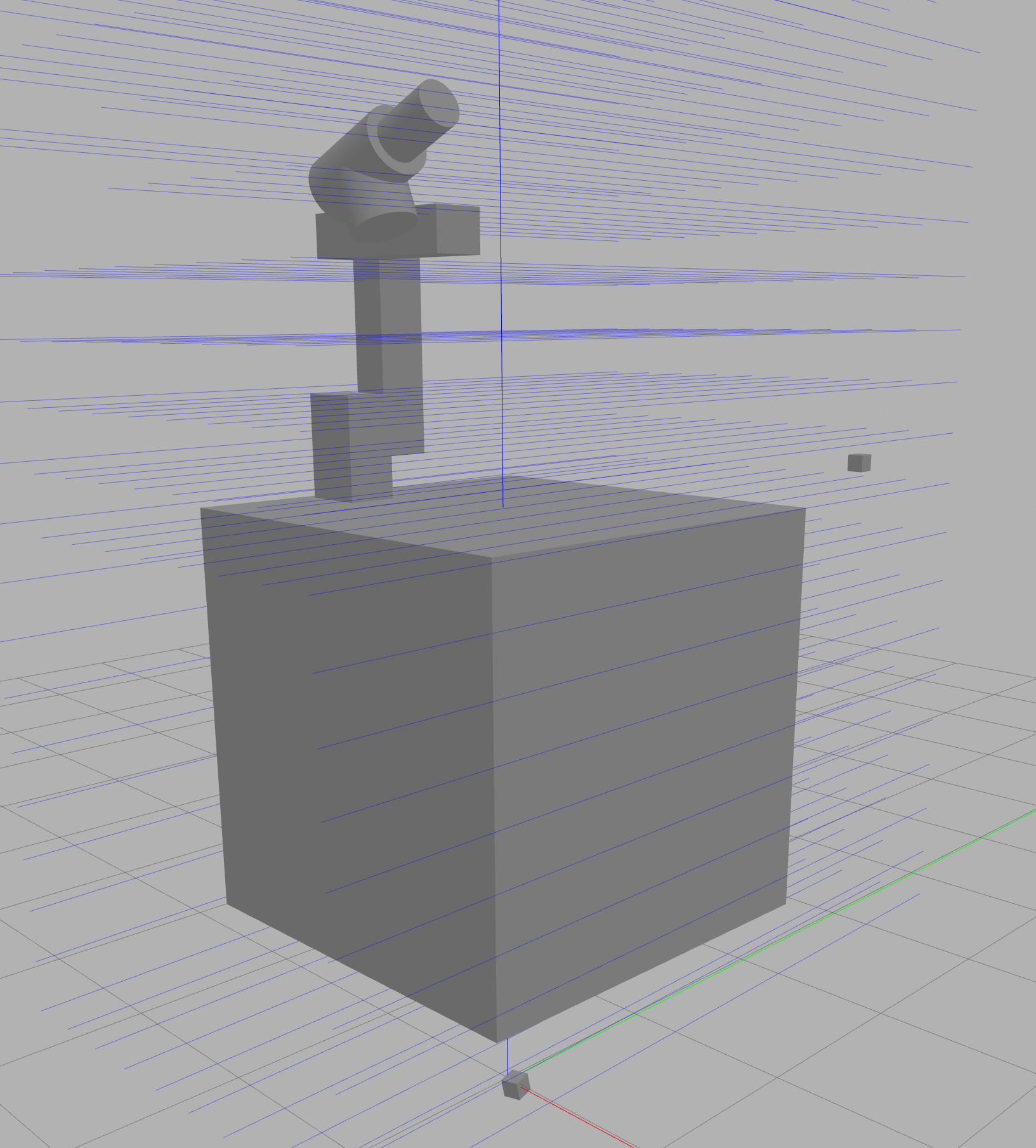
The area of impact of the air with the surface has been simulated using a matrix of single rays, as it is shown in the next image, so the drag is calculated and applied in the area corresponding to each ray. That matrix has to be modified on each application so it covers all the models, and that can be done from the model's file. For example, in the default case of the ETS VII project changing the call to the laser scaner xacro from > orbit_ws > src > ets_vii > urdf > ets_vii_gazebo_wgg.xacro:
<xacro:include filename="$(find orbit_robot_pkg)/urdf/laser_scan.xacro"/>   <!-- Xacro for the laser sensor -->

<!--- SENSOR --->
<link name="drag_sensor_link"/>
<joint name="drag_sensor_joint" type="floating">
    <parent link="base_link"/>
    <child link="drag_sensor_link"/>
    <origin xyz="0 2 1"/>
</joint-->

<!--- Load Sensors -->
<!--
Pose offset in relation to "drag_sensor_link";
Configuration of the ray: lenght, number of rays, angles of the cone;
Configuration of the matrix of rays: x and z number and separation;
Offset of the sensor from the base of the model (it should match with the y components of the joint and pose)
Name of the model to publish the data from the sensor (it should match the name set in the .world file)
-->                         <!-- custom -->
<xacro:multi_laser_scan
        x="-0.0"
        y="2"
        z="1.0"
        roll="0"
        pitch="0"
        yaw="-1.5708"
        visualize="true"
        samples="1"
        min_angle="-0.0"
        max_angle="0.0"
        length_ray="6"
        num_lasers_x="20"
        num_lasers_z="20"
        offset_x="0.25"
        offset_z="0.25"
        offset_model_sensor="2.0"
        model_name="robot"
        reference_link="drag_sensor_link"/>